Efficient transaction processing is important for businesses of every size. Whether a company operates a small retail shop, a busy restaurant, or a large supermarket, providing customers with accurate purchase records helps maintain professional service. Receipt printers play an important role in this process by converting digital transaction information into clear printed documents.
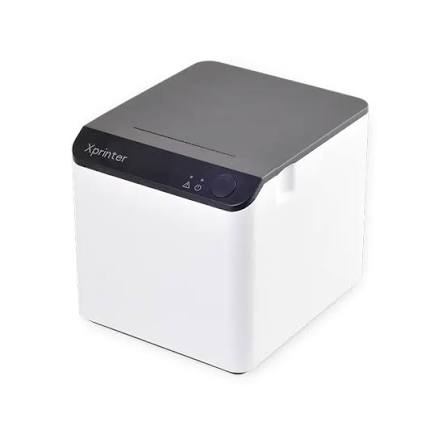
An Xprinter Receipt Printer can support business operations by working with compatible point-of-sale (POS) systems to produce receipts, payment summaries, and other transaction records. Different models offer different printing technologies, connection options, and performance capabilities, allowing businesses to select equipment according to their operational requirements.
1. Faster Transaction Processing
One of the main benefits of receipt printers is their ability to produce transaction records quickly. In retail stores and restaurants, employees often need to complete multiple transactions within a short period.
A suitable thermal receipt printer can print receipts rapidly, helping reduce delays at checkout counters. This is particularly useful during lunch hours, seasonal sales, holidays, and other busy periods.
For large businesses with multiple checkout stations, consistent printing performance can help maintain customer flow across different service points.
2. Improved Customer Experience
Customers generally expect a smooth payment process and a clear record of their purchases. Receipt printers help businesses provide this information immediately after a transaction is completed.
A well-formatted receipt may include product descriptions, quantities, prices, taxes, discounts, payment methods, and transaction details. These records allow customers to review their purchases and keep documentation for future reference.
In addition, reliable receipt printing can reduce the inconvenience caused by missing or unclear transaction information.
3. Practical Solutions for Small Businesses
Small businesses often work with limited budgets, counter space, and staff. A compact receipt printer can help meet everyday billing requirements without requiring a complicated equipment setup.
For example, a small convenience store may need a basic printer connected to a computer or POS terminal. A café may require a model that supports customer bills and order tickets through compatible software.
Choosing equipment with suitable connectivity and straightforward paper replacement can make daily operations easier for employees.
4. Support for Large-Scale Business Operations
Large businesses usually process more transactions and may operate several checkout stations simultaneously. Their printing requirements can therefore differ significantly from those of smaller companies.
Receipt printers with appropriate speed, connectivity, and workload specifications can support these environments. Network-capable models may also be useful where multiple POS terminals need access to shared printing resources.
However, businesses should evaluate each printer’s technical specifications and recommended operating limits before deploying it across multiple locations.
5. Flexible Connectivity Options
Modern POS environments may include computers, dedicated terminals, mobile devices, and network-based systems. Connectivity options help businesses integrate receipt printers into their existing infrastructure.
Depending on the model, available interfaces may include:
- USB: Suitable for direct connections to compatible POS terminals and computers.
- Ethernet: Useful for network-based installations.
- Bluetooth: Supports wireless connections with compatible devices.
- Wi-Fi: Provides wireless network connectivity on supported models.
- Serial: Can work with certain traditional POS systems.
Selecting the correct interface helps reduce installation difficulties and supports dependable communication between the printer and POS software.
6. Reduced Consumable Requirements With Thermal Printing
Many businesses choose thermal receipt printers because they use heat-sensitive paper instead of conventional ink cartridges or toner. This can simplify routine supply management and reduce the need to replace ink-related consumables.
Thermal printing also generally operates quietly, making it suitable for customer-facing counters and other indoor business environments.
Businesses should remember that thermal paper is still a recurring expense. Comparing paper specifications and supply availability is important when calculating long-term operating costs.
7. Better Transaction Records and Business Organization
Printed receipts provide useful documentation for customers, employees, and accounting departments. They can support purchase verification, returns, exchanges, and refund procedures.
For larger organizations, consistent receipt formatting can also make transaction records easier to review across different departments or branches.
When integrated with suitable POS and accounting software, receipt printing becomes part of a broader system for managing sales information and business records.
8. Versatility Across Different Industries
Receipt printers are used in many industries because different businesses need compact, on-demand transaction documentation.
Retail and Supermarkets
Retailers use receipt printers to provide customers with purchase details and payment confirmations. Supermarkets may require equipment capable of handling frequent transactions throughout the day.
Restaurants and Cafés
Food businesses use printers for customer bills and, where supported by their POS configuration, kitchen order tickets. This helps employees communicate order information between service and preparation areas.
Hotels and Hospitality
Hotels can use receipt printers at reception desks and service counters to provide payment records and transaction summaries.
Pharmacies and Service Centers
Pharmacies, repair shops, and other service providers may use receipt printers to document purchases, service charges, and payments. Separate equipment may still be necessary for specialized labels or larger documents.
9. Compact Design and Convenient Installation
Workspace organization matters in both small and large businesses. Compact receipt printers can fit on checkout counters without occupying excessive space.
Their placement should allow employees to replace paper rolls, access connection ports, and perform routine cleaning easily. Businesses operating multiple checkout stations should also consider cable management and consistent installation procedures.
These practical details can help create more organized workstations and simplify equipment management.
10. Maintenance and Long-Term Reliability
Regular maintenance helps receipt printers maintain consistent output. Dust, paper residue, and incorrect roll installation can affect print quality or cause feeding problems.
Employees should clean the print head and paper path according to the manufacturer’s instructions. They should also use compatible paper, inspect cables, and check the device when faded printing or unusual noises occur.
For larger businesses, establishing a routine maintenance schedule can help identify issues before they interrupt important operations.
How to Choose a Suitable Receipt Printer
The right printer depends on transaction volume, business size, software requirements, and working conditions. Small businesses may prioritize affordability and simple installation, while larger organizations may focus on printing speed, network connectivity, and deployment consistency.
Before purchasing, compare printing technology, supported paper width, connection interfaces, driver availability, and maintenance requirements. It is also useful to check the manufacturer’s technical documentation and confirm that the selected model works with the existing POS system.
Conclusion
Xprinter receipt printers can support small and large businesses by helping streamline checkout processes, produce accurate transaction records, and integrate with compatible POS systems. Their practical value comes from selecting the right combination of printing performance, connectivity, design, and maintenance requirements.
By evaluating operational needs before purchasing, businesses can choose receipt-printing equipment that supports efficient daily transactions and a more organized customer service experience.